How to Build an AI Agent Harness for a Local LLM: Skills, Memory and Guardrails with LangChain, Ollama + MCP
- How to Build an AI Agent with Local LLM and Tool Calling — the MCP tool servers, the client and the agent loop.
- How to Build an AI Agent Harness — skills, memory, guarded script execution and a context budget. You are here.
A tool-calling loop is not an agent. The loop is the easy part, and a framework will hand it to you. Everything that makes a local model actually dependable lives in the code around the loop, and that code has a name: the harness.
In the first part of this series, How to Build an AI Agent with Local LLM and Tool Calling, we built a conversational AI agent that runs on Ollama and calls tools through the Model Context Protocol (MCP). It worked. But running it for a week made its limits obvious. Our local 8B model still guessed when asked for the time in Tokyo. It forgot the user as soon as a chat ended. It ran out of context after reading a couple of web pages. And when an MCP server went down, the whole run died with a stack trace instead of telling the user that search was unavailable.
None of those are model problems, so a bigger model does not fix them. They are harness problems: the harness is all the code around the model that decides what it sees, what it can do, and what happens when something goes wrong. In this second part we rebuild the agent on LangChain and add a minimal harness — about 700 lines of Python — that gives it:
- Skills — packaged expertise in the same
SKILL.mdformat as Claude Code and Codex, loaded only when a task needs it - Long-term memory — an
AGENTS.mdfile of facts about the user that persists across conversations - Deterministic scripts — the model runs a script for an exact answer instead of doing the arithmetic in its head
- Guardrails — an allowlisted executable runner that uses no shell, capped outputs, and errors returned to the model instead of crashing the run
- Observability — every model call, tool call and skill load traced in LangSmith
All inference still runs on private infrastructure: qwen3 8B on Ollama, with an 8,192-token context window on a single 8 GB GPU.
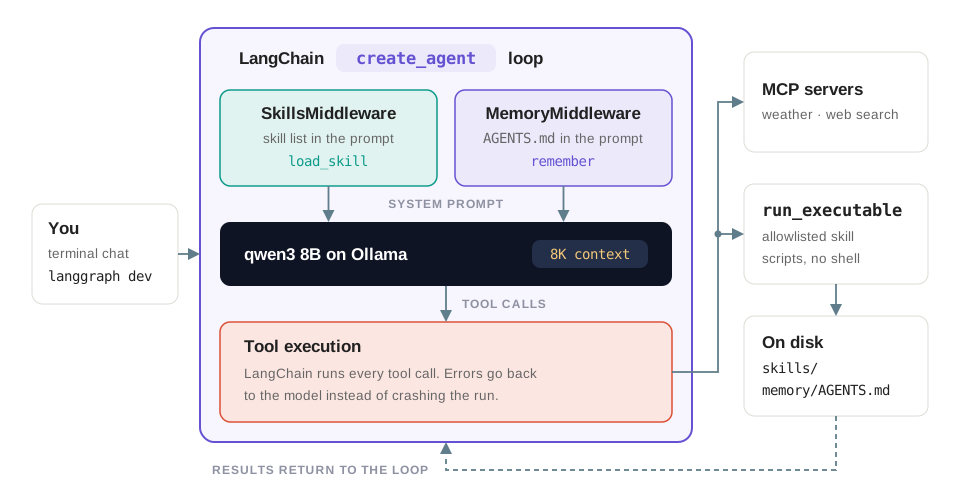 The whole harness. Two middleware classes shape what the model sees, LangChain runs the loop, and one guarded tool is the only path from a model's output to a running process.
- ~700lines of harness code
- 8,192token context window
- 8tools bound at startup
- 0tokens sent to a model vendor
What is an Agent Harness?
LangChain's documentation separates three layers, and the distinction is worth internalising before writing any code. Frameworks such as LangChain "provide abstractions that make it easier to get started when building with LLMs". Runtimes such as LangGraph "provide the tooling for running agents in production". Harnesses such as the Deep Agents SDK are "opinionated, batteries-included frameworks with built-in tools and capabilities for building sophisticated, long-running agents."
Put simply: Model + Harness = Agent. The model contributes language and judgement. Everything else — what gets into the prompt, which tools exist, what happens on failure, what survives the end of a conversation — is a decision the harness makes on the model's behalf.
| Component | Role in the agent harness |
|---|---|
| Loop | Calls the model, runs the tools it asks for, and repeats until it answers |
| Tools | MCP servers for weather and web search, plus local tools for skills and memory |
| Skills | Instructions and scripts for one kind of task, loaded on demand |
| Memory | Facts about the user that outlive a single conversation |
| Context | The 8,192-token budget that everything above has to share |
| Guardrails | Allowlists, timeouts, size limits and error handling around every tool call |
Step 1: Replacing the Hand-Written Loop with LangChain
In part 1 we wrote our own MCP client, a ToolWrapper that turned JSON Schemas into Python signatures, and a while True loop around ollama.chat. LangChain now handles all three. langchain-mcp-adapters discovers the MCP tools and converts them to LangChain tools, ChatOllama talks to the local model, and create_agent builds the tool-calling loop as a LangGraph graph:
from langchain.agents import create_agent
from langchain_mcp_adapters.client import MultiServerMCPClient
from langchain_ollama import ChatOllama

# Discover the tools of every MCP server in mcp_server_config.json
client = MultiServerMCPClient(config["mcpServers"], tool_interceptors=[error_interceptor, logging_interceptor])
tools = await client.get_tools()
for tool in tools:
    # Return tool errors to the model instead of aborting the run
    tool.handle_tool_error = True

# Local LLM: qwen3 8B with thinking enabled and an 8K context window
model = ChatOllama(model="qwen3", reasoning=True, num_ctx=8192)

agent = create_agent(model, tools, name="personal_assistant", middleware=middleware, system_prompt=SYSTEM_PROMPT)
The MCP servers from part 1 did not change. The configuration now names the transport explicitly:
{
  "mcpServers": {
    "weather_tools": {"transport": "sse", "url": "http://weather_tools:8000/sse"},
    "search_tools": {"transport": "sse", "url": "http://search_tools:8001/sse"}
  }
}Ollama's default context is 4,096 tokens. That overflows as soon as a skill is loaded and the model starts thinking. 8,192 is the largest window at which qwen3 8B still fits entirely on an 8 GB GPU. After the first answer, run ollama ps: if the PROCESSOR column shows a CPU/GPU split instead of 100% GPU, the window is too large for your card and responses will be much slower.
Error handling is the other thing the framework buys us. An interceptor wraps every MCP call and turns failures — such as a dropped server connection — into a ToolException. Because every tool has handle_tool_error = True, the model receives the error as the tool result and can tell the user "web search is unavailable right now", instead of the whole run failing:
async def error_interceptor(request: MCPToolCallRequest, handler):
    """Report failures to reach the MCP server as tool errors, which the model sees."""
    try:
        return await handler(request)
    except ToolException:
        raise
    except Exception as e:
        raise ToolException(f"Tool '{request.name}' failed: {describe_error(e)}") from e
Step 2: Middleware, Where the Harness Plugs In
create_agent runs the standard agent loop: call the model, run any tools it asked for, repeat until it answers. LangChain middleware lets you add to that loop without rewriting it. Our harness uses two hooks:
wrap_model_callchanges the request before the model sees it. We use it to append to the system prompt.wrap_tool_callintercepts a tool call before LangChain runs it.
A middleware can also register its own tools through its tools attribute, and they are bound to the model next to the MCP tools. Both of our middleware classes follow this pattern, shown here in simplified form:
from langchain.agents.middleware import AgentMiddleware, ModelRequest
from langchain.messages import SystemMessage

# Simplified: the pattern SkillsMiddleware and MemoryMiddleware share
class PromptMiddleware(AgentMiddleware):
    def __init__(self, text: str, tools: list):
        self._text = text
        self.tools = tools  # registered with the agent next to the MCP tools

    async def awrap_model_call(self, request: ModelRequest, handler):
        blocks = list(request.system_message.content_blocks) if request.system_message else []
        system = SystemMessage(content=[*blocks, {"type": "text", "text": self._text}])
        return await handler(request.override(system_message=system))
The division of labour matters, and it is the rule that kept this codebase small: the middleware only adds context. Running tools remains LangChain's job.
Step 3: Skills, or Loading Expertise Only When It Is Needed
A skill is a folder containing a SKILL.md file: YAML frontmatter with a name and a description, followed by markdown instructions, plus any scripts or reference files the task needs. This is the same layout Claude Code and Codex use, so skills can move between agents.
---
name: timezone
description: Current time and weekday anywhere in the world, converting a time from one place or
  timezone to another, and how many hours apart two times in different places are. Use it for every
  question about times, timezones, time differences or daylight saving time instead of calculating
  them yourself.
---

# Timezone

Answer time and timezone questions only by running the scripts below. ...
Putting every skill in the prompt does not scale on a small context window. With 20 skills, the full instructions would take roughly 13,000 tokens — more than the whole 8K window, before the user has said a word. SkillsMiddleware implements LangChain's skills pattern with progressive disclosure, so the skill list plus one loaded skill costs roughly 2,600 tokens:
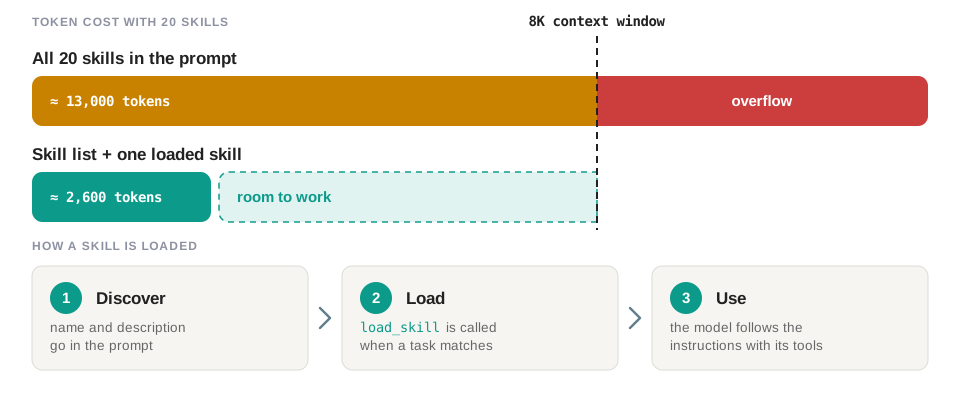 Progressive disclosure. Each skill costs one line of prompt until the model decides it needs the rest.
- Discover At startup,
discover_skills()scansskills/*/SKILL.md. Before every model call, the middleware appends one line per skill — its name and description — to the system prompt. - Load When a request matches a description, the model calls
load_skill, which returns the skill's instructions and the list of files bundled with it. - Use The model follows the instructions with the tools it has, and reads bundled reference files with
read_skill_file.
listing = "\n".join(
    f'- {skill.name}: {skill.description} To use it, call load_skill(skill_name="{skill.name}").'
    for skill in skills.values()
    if not skill.hidden
)

@tool(parse_docstring=True)
async def load_skill(skill_name: str) -> str:
    """Load the full instructions of a skill, and of the skills it requires, and list the files bundled with them.

    Args:
        skill_name: Name of the skill, as listed under "Available skills".
    """
    skill = get_skill(skills, skill_name)
    # Reading files must not block the event loop that `langgraph dev` runs on
    return await asyncio.to_thread(describe, skill, with_requirements(skill))
Skills can also share instructions: a skill lists other skills under requires, and hidden: true keeps a shared skill out of the prompt so it is only loaded as a dependency.
Lessons from running skills on an 8B model
Most of the tuning below exists because a small model behaves differently from a frontier one. These are the five changes that moved the needle:
- Spell out the call
- Each line in the skill list ends with the exact
load_skill(...)call. Without it, small models try to call the skill name as if it were a tool. - Redirect when they do it anyway
wrap_tool_callcatches a call to a skill name and replies "'timezone' is a skill, not a tool. Call load_skill(skill_name="timezone")". LangChain's generic "invalid tool" error does not tell the model how to recover.- Keep skill names different from tool names
qwen3sometimes called a skill namedweb-searchinstead of itsweb_searchtool.- Give skills priority over tools
- The system prompt tells the model to load a matching skill even if one of its tools could handle the request directly. Otherwise it skips the skill and answers from memory.
- Edit without restarting
SKILL.mdis re-read every time a skill is loaded, so you can tune instructions while the agent runs.
Step 4: Skills Say What, Not How, and Scripts Run Safely
A skill never names a tool. The research skill says "search the web", not web_search. The timezone skill shows the command line a person would type: python scripts/current_time.py --tz Asia/Tokyo. The model picks the tool for each step from the tools' own descriptions. This keeps skills portable across agents, and when no tool can do a step, the model says so instead of making up a result.
Why scripts? LLMs are bad at date arithmetic and daylight saving time. The timezone skill tells the model never to calculate times itself: it runs a deterministic script and answers from the JSON output:
{
  "timezone": "Asia/Tokyo",
  "readable": "Monday 21 September 2026, 18:58 JST",
  "time": "2026-09-21T18:58:25+09:00",
  "weekday": "Monday",
  "utc_offset": "+09:00",
  "abbreviation": "JST"
}
The command lines run through a single generic tool, run_executable(executable, executable_args, skill_name). Its description explains how to split a command line into a call. Because it executes code chosen by a model, this is where most of the guardrails live:
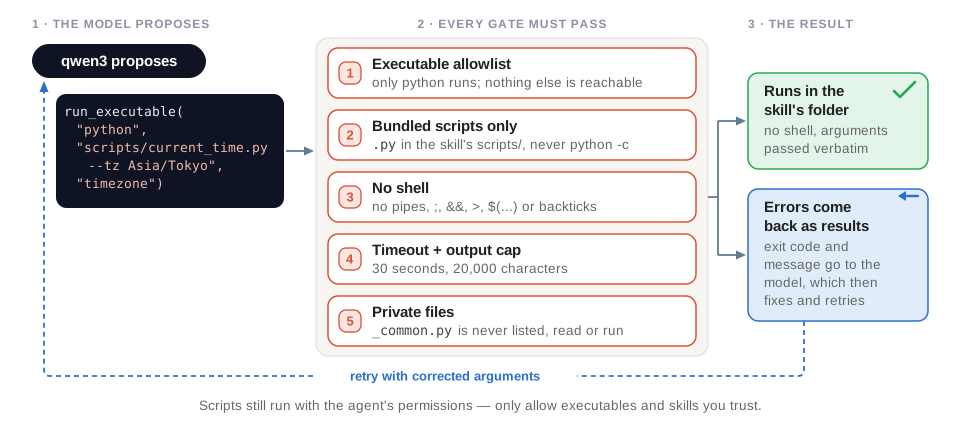 Every gate a model-chosen command has to pass. The last one is the important one: a rejection is a result, not a crash.
# Only these executables can run. Python only runs .py scripts bundled with a skill
PYTHON = Executable(sys.executable, script_suffixes=(".py",), env={"PYTHONDONTWRITEBYTECODE": "1"})
EXECUTABLES = {"python": PYTHON, "python3": PYTHON}# No shell: arguments reach the executable verbatim and cannot run other commands
result = subprocess.run(
[config.path, *argv], # argv = shlex.split(executable_args)
cwd=skill.directory, # runs inside the skill's folder
env={**os.environ, **config.env},
capture_output=True,
text=True,
timeout=TIMEOUT_SECONDS, # 30 seconds
)| Guardrail | What it prevents |
|---|---|
| Executable allowlist | Running anything not listed in EXECUTABLES |
| Bundled scripts only | Running code the model wrote, such as python -c ...: the first argument must be a .py file in the skill's scripts/ folder |
| No shell | Chaining commands: pipes, ;, &&, redirections, $(...) and backticks are rejected, with a message explaining how to run commands one at a time |
| Timeout and output cap | Hung scripts (30 seconds) and outputs that flood the context (20,000 characters) |
| Private files | Helpers such as _common.py are never listed, read or run |
| Errors as results | A failed command returns its exit code and message, so the model fixes the arguments and retries |
Scripts still run with the agent's permissions. The allowlist limits which binaries a model can reach, not what a script you installed is allowed to do once it runs. Only allow executables and install skills you trust, and treat a third-party skill folder the way you would treat a third-party dependency.
Step 5: Long-Term Memory with AGENTS.md
The message history is short-term memory: it ends with the conversation. Long-term memory lasts across conversations. MemoryMiddleware follows the Deep Agents design — an AGENTS.md file loaded into the system prompt — but gives the model an append-only remember tool instead of general file editing:
- Load Before every model call, the middleware re-reads
memory/AGENTS.md, strips HTML comments and appends it to the system prompt, together with instructions on when to save new facts. - Remember When the user shares something that will matter later — their name, home timezone or formatting preferences — or corrects the agent, the model saves one short sentence.
@tool(parse_docstring=True)
def remember(fact: str) -> str:
    """Save a fact about the user to your long-term memory, so you still know it in future conversations.

    Args:
        fact: One short sentence about the user, starting with "The user".
    """
    return self.save(fact)
The memory is a plain markdown file that people can read and edit:
<!-- Comments are not sent to the model. -->

- The user's home timezone is Asia/Tokyo.
- The user prefers the 24-hour clock.
Keeping it small and safe took a handful of deliberate constraints:
- Each fact is at most 200 characters, and duplicates are skipped.
- The whole memory is capped at 2,000 characters, about 500 tokens. When it is full,
remembersaves nothing and tells the model to ask the user to remove outdated entries. - To change a fact, the model saves the new version, and the prompt says later entries win. Because the tool can only append, the model never rewrites or deletes what is already there. People prune the file by hand.
- Writes go through a lock, because
langgraph devcreates a new middleware for every request. - It lives in
memory/rather than the repository root, because coding agents such as Codex read a rootAGENTS.mdas instructions for working on the code.
The memory holds personal data, so it is git-ignored. It is also part of the system prompt, which means it reaches LangSmith when tracing is on. Only store what you would be comfortable putting in a system prompt yourself — and if you operate under GDPR, treat the file as a record that has to be locatable and deletable on request.
Step 6: Budgeting the Context Window
Everything the model sees on a call has to fit in one window. Here is roughly how the 8,192 tokens are spent on a single research question, estimated at 4 characters per token:
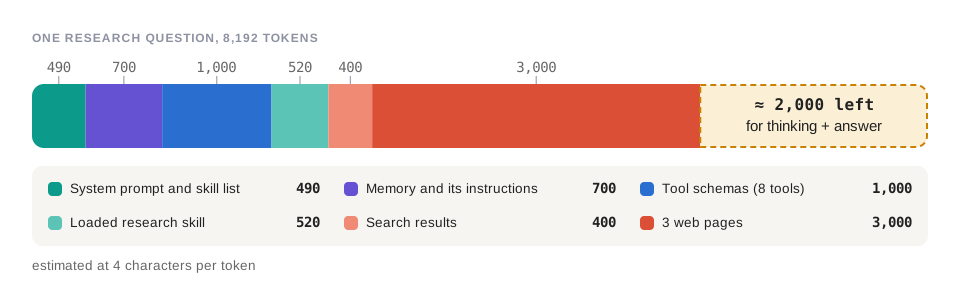 Three web pages are half the window. Everything the harness adds — prompt, memory, tool schemas, the loaded skill — is smaller than what one tool call drags in.
| Part of the context | Tokens (approx.) |
|---|---|
| System prompt and skill list | 490 |
| Memory and its instructions | 700 |
| Tool schemas (8 tools) | 1,000 |
| Loaded research skill | 520 |
| Search results | 400 |
| 3 web pages | 3,000 |
| Left for thinking and the answer | ≈ 2,000 |
To stay inside that budget, the harness caps each part of the context instead of relying on the model to be brief:
- Skills cost one line each until they are loaded.
- The research skill asks for 5 search results instead of 10, reads 4,000 characters per page instead of 10,000, and never reads more than three pages per question.
- Memory is capped at 2,000 characters, and skill files and script output at 20,000 characters.
For long-running tasks, fixed limits eventually stop being enough. LangChain's Deep Agents harness adds three strategies on top: it offloads large tool results to files and passes the model a path, summarizes old messages as the window fills up, and isolates heavy work in subagents that return only a short report.
Step 7: Wiring It Together, Running and Tracing
build_agent() combines the MCP tools, the skills, the executable runner and the memory:
async def build_agent() -> Agent:
    """Create the agent with the tools of the MCP servers, the local skills and long-term memory."""
    client = MultiServerMCPClient(config["mcpServers"], tool_interceptors=[error_interceptor, logging_interceptor])
    available_tools = await get_tools(client)

    skills = await asyncio.to_thread(discover_skills, SKILL_DIRECTORIES)
    if skills:
        available_tools.append(create_executable_tool(skills, EXECUTABLES))

    skills_middleware = SkillsMiddleware(skills)
    memory = MemoryMiddleware("memory/AGENTS.md")

    # Middleware add their prompts in list order. Memory goes last because it changes as the agent learns
    return Agent(model="qwen3", thinking=True, tools=available_tools, middleware=[skills_middleware, memory])
The agent runs as an interactive chat (python -m agent.main), or behind a local LangGraph API server with langgraph dev. The server builds a fresh graph for every request, so the agent always uses the tools the MCP servers offer at that moment:
{
  "dependencies": ["."],
  "graphs": {"personal_assistant": "./agent/main.py:make_graph"},
  "env": ".env"
}
async def make_graph() -> CompiledStateGraph:
"""Graph factory for `langgraph dev`, called for every request so MCP tools are always current."""
return (await build_agent()).graphlanggraph dev
curl -s http://127.0.0.1:2024/runs/wait \
-H 'Content-Type: application/json' \
-d '{"assistant_id": "personal_assistant",
"input": {"messages": [{"role": "user", "content": "What time is it in Tokyo right now?"}]}}'With LANGSMITH_TRACING=true and an API key in .env, every run appears in LangSmith as a trace: each model call, load_skill, script run and tool call, with inputs, outputs, token counts and timings. This is how you find out why a small model picked the wrong tool — guessing at it from the final answer is hopeless. Note that tracing sends prompts and tool results to LangSmith's servers, while the model itself still runs locally; on a strict-privacy deployment you would keep tracing off or self-host the collector.
langgraph dev rejects blocking I/O on its event loop. Every file read in the harness — skill discovery, loading a skill, reading memory — goes through asyncio.to_thread. It is an easy thing to get wrong once and then hit intermittently for a week.
AI Agent Request Flow: One Question Through the Harness
The memory already holds "The user's home timezone is Asia/Tokyo." The user asks: "What time is it at home?"
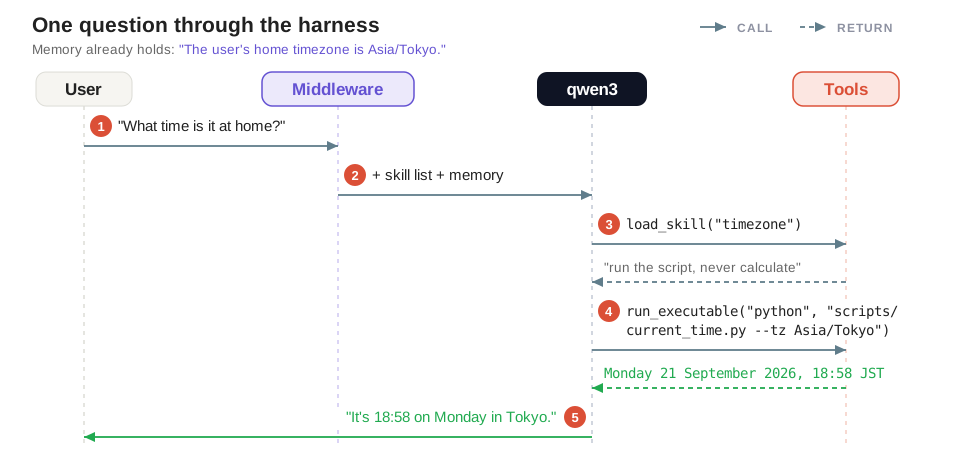 Four participants, five messages. Note where the timezone comes from: memory, not the question.
- User → agent "What time is it at home?"
- Middleware Appends the skill list and the memory to the system prompt.
- qwen3 → load_skill("timezone") The question matches the timezone skill, whose instructions say to run a script and never calculate times.
- qwen3 → run_executable(...) The home timezone comes from memory, and
scripts/current_time.py --tz Asia/Tokyoreturns "Monday 21 September 2026, 18:58 JST". - qwen3 → user "It's 18:58 on Monday in Tokyo."
The skill said what to do, the script did the math, the memory supplied the timezone and LangChain ran the tools. The model's only real contribution was choosing correctly at each step — which is exactly what it is good at, and all we should be asking of it.
Build or Adopt? The Deep Agents SDK
Everything we built by hand is also available in LangChain's open-source Deep Agents harness, where our middleware becomes a few arguments:
agent = create_deep_agent(
    model=ChatOllama(model="qwen3"),
    tools=mcp_tools,
    backend=FilesystemBackend(root_dir=".", virtual_mode=True),
    skills=["/skills/"],
    memory=["/memory/AGENTS.md"],
    interrupt_on={"edit_file": True},
)| Capability | Our harness | Deep Agents |
|---|---|---|
| Skills | ✓ | ✓ |
| Long-term memory | ✓ | ✓ |
| Summarization | ● output caps only | ✓ |
| Planning (to-do lists) | ✗ | ✓ |
| Subagents | ✗ | ✓ |
| Human approval | ✗ | ✓ |
So why build it by hand? You get about 700 lines you can read end to end, prompts tuned for an 8B model with an 8K window, and a clear picture of what a harness actually does before you adopt a larger one. Our recommendation for a team starting now: build the small one first to learn the failure modes on your own workload, then move to Deep Agents the moment you need planning, subagents or human approval — those three are not worth reimplementing.
Benefits for Enterprise AI Implementation
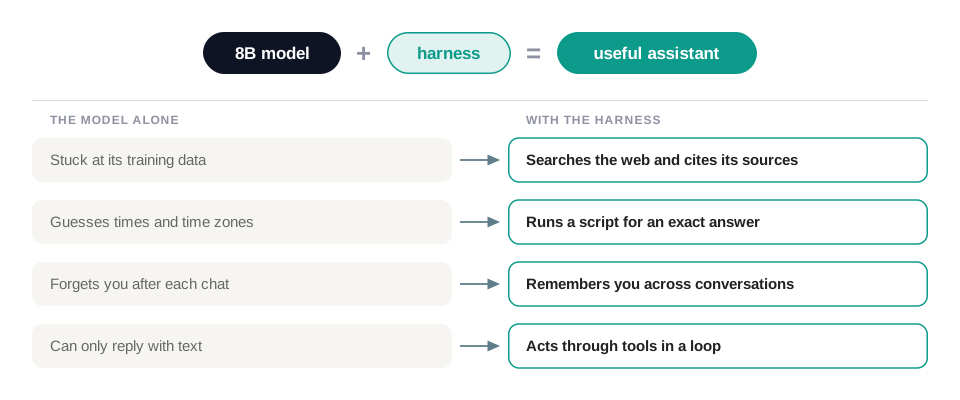 The same 8B model, before and after the harness. None of these differences come from the weights.
| Requirement | How the harness delivers |
|---|---|
| Data privacy | Local LLM inference on Ollama; memory stays on your own disk; tracing is opt-in |
| Reliability | Deterministic scripts for exact answers; tool errors go back to the model instead of crashing the run |
| Context efficiency | Progressive disclosure: each skill costs one line until it is needed |
| Personalization | AGENTS.md memory across conversations, readable and editable by people |
| Safety | Allowlisted executables, no shell, bundled scripts only, timeouts and output caps |
| Extensibility | A new capability is a folder with a SKILL.md; new tools are new MCP servers |
| Portability | The same skill format as Claude Code and Codex |
| Observability | LangSmith traces for every model call, tool call and skill load |
Summary
A local LLM with tool calling is a good start, but on its own it is not a dependable assistant. The model predicts text; the harness gets work done. By wrapping a LangChain agent loop with a small set of middleware, we gave an 8B model on a single GPU the things it could not do alone: follow packaged expertise, run deterministic scripts instead of guessing, remember the user across conversations and recover from its own mistakes — all without sending data to an external model provider.
In this guide we replaced part 1's hand-written loop with LangChain's create_agent, then added skills with progressive disclosure, a guarded executable runner, an append-only long-term memory and a context budget that fits into 8,192 tokens. Each piece is small and readable, and each one solves a specific failure we saw when running a small local model.
From here, you can write new skills for your own workflows, point the agent at your internal systems through MCP servers, or move to a full harness such as Deep Agents when you need planning, subagents and human approval. Keep iterating, trace every run, and let the harness do the work that the model cannot.
For more details please check the full implementation.
References
- [1] How to Build an AI Agent with Local LLM and Tool Calling — part 1 of this series
- [2] LangChain docs — frameworks, runtimes and harnesses
- [3] LangChain docs — middleware overview
- [4] LangChain docs — agent skills
- [5] LangChain docs — Deep Agents overview
- [6] LangChain docs — Deep Agents skills
- [7] langchain-mcp-adapters on GitHub
- [8] Ollama docs — tool calling

Related Posts

Categories
- Pytorch (1)
- MLOps (1)
- Agentic (3)
- Big Data (5)
- Data Governance (1)
- Industry 4.0 (1)
- Databricks (1)
- Python (6)
- Ollama (2)
- Spark (1)
- Artificial Intelligence (1)
- LLM (3)
- PostgreSQL (4)
- CNN (1)
- MCP (2)
- Django (2)
- Machine Learning (4)
- Deep Learning (2)
- Industrial Automation (1)
- LangChain (1)